
You press the Espresso button expecting a small shot, but your Nespresso fills half the cup. Or perhaps your Lungo button suddenly produces much less coffee than it used to.
This can be frustrating, especially when your machine worked perfectly before.
The good news is that a Nespresso machine giving the wrong cup size does not always mean something is broken. In many cases, someone has accidentally changed the coffee volume setting. A water-flow problem or a capsule recognition issue can also affect the amount of coffee you receive.
The correct fix depends on whether you own a Nespresso Original or Vertuo machine. These two systems work differently, so their cup-size settings are not identical.
In this guide, I will explain how to identify the problem, adjust your coffee volume, restore the default settings where appropriate, and troubleshoot common issues.
Quick Answer: How to Fix the Wrong Nespresso Cup Size
If your Nespresso machine pours too much or too little coffee, start by checking its programmed volume.
For most Nespresso Original machines:
- Fill the water tank and turn on the machine.
- Insert a compatible capsule and place a cup under the outlet.
- Press and hold the Espresso or Lungo button.
- Release the button when the amount of coffee you want reaches your cup.
- The machine will save the new volume for that button.
For compatible Nespresso Vertuo machines:
- Insert the capsule whose coffee volume you want to change.
- Close and lock the machine.
- Press and hold the coffee button while brewing.
- Release it when the desired amount reaches your cup.
- The new volume is stored for the capsule type used during programming.
Important: Original machines usually store volume settings separately for their coffee buttons. Vertuo machines store customized volumes for the capsule type used during programming. Check your exact model’s manual before resetting the machine.
Why Is Your Nespresso Giving the Wrong Cup Size?

Several things can cause a Nespresso machine to dispense a different amount of coffee than you expect.
Here are the most common possibilities.
1. Your Coffee Volume Was Accidentally Reprogrammed
This is one of the first things I would check.
Most Nespresso Original machines allow you to change the amount of coffee produced by the Espresso and Lungo buttons.
For example, suppose you hold the Espresso button while the machine is brewing and release it when your cup is nearly full. The machine can save that longer volume as the new Espresso setting.
The next time you press Espresso, it may produce much more coffee than the usual 40 ml.
The same can happen with the Lungo button.
On compatible Vertuo machines, holding the coffee button during brewing can also save a customized volume for the capsule type being used.
2. Only One Coffee Button Is Dispensing the Wrong Amount
If your Espresso button works normally but Lungo pours too much coffee, the problem may be limited to the Lungo volume setting.
The opposite can happen too.
On Original machines with separate Espresso and Lungo buttons, each button can have its own programmed volume.
Before resetting the entire machine, check whether only one button needs to be reprogrammed.
3. All Your Nespresso Coffee Buttons Are Giving the Wrong Volume
If more than one coffee button produces an unexpected amount, you may have several changed settings.
You should also check whether you are comparing the coffee output with the correct standard volume.
If the settings are clearly wrong, consider restoring the factory defaults using the procedure for your exact machine.
Do not use a reset combination from another Nespresso model. The steps can differ between machines.
4. Your Vertuo Capsule Has a Different Standard Cup Size
Nespresso Vertuo machines do not work like the Original range.
A Vertuo machine reads the barcode on a compatible capsule and uses that information to prepare the coffee.
Different capsules are designed for different drink sizes.
For example, a Double Espresso capsule is designed to produce more coffee than a standard Espresso capsule. A Mug capsule produces a much larger serving.
If you expect every Vertuo capsule to fill the same cup, the machine may appear to be using the wrong volume when it is actually following the capsule’s instructions.
You can check the available sizes in Nespresso’s official Vertuo cup-size guide.
5. Your Machine Has a Water-Flow Problem
Sometimes the cup-size setting is correct, but the machine still produces less coffee than expected.
Possible causes include:
- An incorrectly positioned water tank.
- Mineral buildup inside the water system.
- Restricted water flow.
- A damaged or unsuitable capsule.
- A brewing-unit problem.
If your Nespresso also makes unusual noises, stops during brewing, or produces only a few drops, it may be a broader brewing problem rather than a cup-size setting issue.
You can follow our guide on how to fix a Nespresso machine that is not brewing for those symptoms.
How to Fix Nespresso Wrong Cup Size on Original Machines
Nespresso Original machines commonly have separate Espresso and Lungo buttons.
The usual factory volumes are:
| Coffee Type | Standard Volume |
|---|---|
| Espresso | 40 ml / 1.35 fl oz |
| Lungo | 110 ml / 3.72 fl oz |
Some coffee styles, such as Ristretto, use a shorter extraction. However, most two-button Original machines do not have a separate Ristretto button.
If your machine pours the wrong amount, try the following steps.
How to Reprogram the Nespresso Espresso Button
Follow these steps to change the Espresso volume on a compatible Original machine.
- Fill the water tank with fresh drinking water.
- Turn on your Nespresso machine.
- Wait until the indicator lights show that the machine is ready.
- Insert a fresh, compatible Nespresso capsule.
- Place your cup under the coffee outlet.
- Press and hold the Espresso button.
- Keep holding it while coffee flows into the cup.
- Release the button when the desired amount has been dispensed.
The machine should store the new volume for future Espresso preparations.
For example, if you prefer a slightly larger espresso, you can set a volume that suits your cup and taste.
The exact button layout may differ between Original models. Nespresso’s Inissia machine assistance guide explains the official programming process.
How to Reprogram the Nespresso Lungo Button
The Lungo button can be programmed in a similar way.
- Fill the water tank.
- Turn on the machine and wait until it is ready.
- Insert a compatible capsule.
- Place a larger cup under the coffee outlet.
- Press and hold the Lungo button.
- Release it when the desired coffee volume reaches the cup.
The new setting should be saved for future Lungo preparations.
Be careful not to hold the button longer than necessary. Otherwise, you may save more coffee than you intended.
How to Restore Default Nespresso Original Cup Sizes
If reprogramming does not solve the problem, you may want to restore the factory settings.
For example, Nespresso’s Inissia assistance guide gives the following reset procedure:
- Turn off the Inissia machine.
- Press and hold the Lungo button for five seconds.
- Watch for the LEDs to blink quickly three times.
- Wait for the machine to return to its normal ready state.
The default volumes for this Inissia guide are 40 ml for Espresso and 110 ml for Lungo.
Do not assume this reset procedure works on every Original machine. Pixie, CitiZ, Essenza Mini, and other models may have different instructions.
Check the official Nespresso Pixie assistance guide or your own model’s manual before resetting.
How to Test Your Original Machine After Reprogramming
After changing the settings, test both buttons separately.
Use a measuring cup if possible. This makes it easier to compare the actual coffee output with your chosen volume.
Check these things:
- Does Espresso stop at the correct amount?
- Does Lungo produce the expected volume?
- Has the machine saved the new settings?
- Does the coffee volume remain consistent over several brews?
If only one button still produces the wrong amount, repeat the programming process for that button.
How to Fix Nespresso Wrong Cup Size on Vertuo Machines
Nespresso Vertuo machines use capsule barcode recognition.
This means the machine identifies the capsule and selects the brewing parameters for it. Different capsule types are designed for different coffee volumes.
Here is a general reference table.
| Vertuo Coffee Type | Typical Volume |
|---|---|
| Ristretto | 25 ml / 0.85 fl oz |
| Espresso | 40 ml / 1.35 fl oz |
| Double Espresso | 80 ml / 2.7 fl oz |
| Gran Lungo | 150 ml / 5.1 fl oz |
| Mug | 230 ml / 7.8 fl oz |
| XL / Alto or Cold Brew Style | 355 ml / 12 fl oz |
| Carafe | 535 ml / 18.1 fl oz |
Not every Vertuo machine supports every capsule size. Availability depends on the model and compatible capsule range.
How to Reprogram the Vertuo Cup Size
On compatible Vertuo machines, you can customize the amount of coffee produced by a particular capsule type.
Follow these general steps:
- Open the machine head.
- Insert the capsule whose volume you want to change.
- Close the head and lock the machine.
- Wait until the machine is ready.
- Place a suitable cup under the coffee outlet.
- Press and hold the coffee button.
- Release the button when the desired amount reaches your cup.
The machine saves the new volume for the capsule type used during programming.
For example, changing the volume for a Mug capsule does not automatically mean every other capsule will use that same volume.
The official Nespresso Vertuo Next guide explains this model’s programming procedure.
Why Is Your Vertuo Pouring Too Much Coffee?
If your Vertuo produces more coffee than expected, check these possibilities:
- The capsule type is designed for a larger drink.
- Someone previously customized that capsule’s volume.
- You are using a different capsule from the one you normally brew.
- The programmed volume needs to be restored.
Try a fresh capsule of the same type and compare the result.
If the machine repeatedly produces the wrong amount, check the model-specific reset instructions.
Why Is Your Vertuo Pouring Too Little Coffee?
A small amount of coffee can have several causes.
First, confirm that the capsule is designed for the cup size you expect. A standard Espresso capsule will not produce the same volume as a Mug capsule.
Next, check whether the capsule’s volume was previously customized.
If the machine still produces too little liquid after checking the settings, inspect the water tank and follow the cleaning or descaling instructions for your model.
Can You Change Vertuo Cup Size Using the Nespresso App?
Some connected Vertuo models offer additional volume customization through the Nespresso app.
For example, Nespresso’s Vertuo Up support guide explains how compatible connected machines can adjust coffee volume through the Smart App.
However, this feature is not available on every Vertuo machine.
Check your model’s manual and app compatibility before looking for this option.
You can find the relevant instructions in the official Nespresso Vertuo Up guide.
How to Restore Default Vertuo Cup Sizes
If you have changed several cup-volume settings and cannot remember the original values, restoring the factory settings may help.
However, the reset procedure differs between Vertuo models.
For example, Vertuo Up has separate options for resetting customization parameters and performing a full factory reset. Other models use different procedures.
Before resetting, check the official guide for your exact machine. A full reset on a connected model may also affect its app connection or saved settings.
Nespresso Vertuo Only Brews 40 ml of Water: What Does It Mean?

If your Vertuo produces only a small amount of plain water instead of coffee, the issue may involve capsule recognition.
This is different from simply having the wrong cup-size setting.
On the Vertuo Up, Nespresso explains that if the machine cannot read the printed capsule code, it may dispense approximately 40 ml of non-drinkable water as a short rinsing operation.
If this happens:
- Stop using the affected capsule.
- Open the machine head according to the instructions.
- Remove the used capsule.
- Check whether the capsule or its printed code is damaged.
- Insert a fresh, compatible Vertuo capsule.
- Close and lock the machine.
- Try brewing again.
Do not drink the water produced during this barcode-reading error.
If the machine repeatedly fails to recognize fresh capsules, contact Nespresso support.
This 40 ml behaviour is specifically documented in the Vertuo Up troubleshooting guide. Do not assume every Vertuo model displays the same symptom or uses the same troubleshooting procedure.
What If Your Nespresso Cup Size Is Still Wrong After Reprogramming?
If the volume remains inconsistent, use this checklist before assuming the machine is faulty.
Check Whether You Programmed the Correct Button or Capsule
On Original machines, make sure you changed the correct Espresso or Lungo button.
On Vertuo machines, repeat the programming process using the same capsule type you want to customize.
Check the Water Tank
Make sure the tank contains enough fresh water and is properly positioned.
A poorly seated tank can interfere with normal water delivery.
Check for Scale Buildup
Mineral deposits can restrict water flow and affect brewing performance.
Follow the descaling instructions for your model and use a product approved by the manufacturer.
For more guidance, read our article on how often you should descale your coffee maker.
Check for Capsule Problems
A damaged or incompatible capsule may cause unusual brewing behaviour.
For Vertuo machines, check the capsule barcode and use a fresh compatible capsule when troubleshooting.
Look for Other Brewing Symptoms
If your machine also makes unusual noises, stops halfway through brewing, or produces only a few drops, the problem may be related to water flow or the brewing unit.
Our guide to coffee makers making weak or watery coffee explains why an incorrect water-to-coffee balance can affect the taste of a drink.
Nespresso Original vs Vertuo: Cup Size Comparison
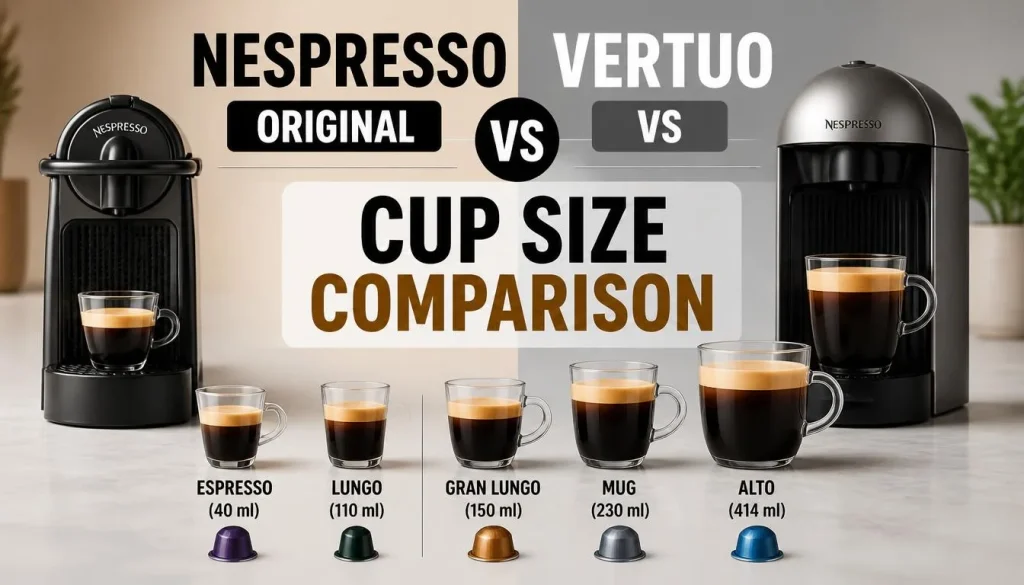
The two systems have different brewing methods and cup-size controls.
| Feature | Nespresso Original | Nespresso Vertuo |
|---|---|---|
| Brewing system | Pressure-based extraction | Barcode-based Centrifusion extraction |
| Common cup sizes | Espresso and Lungo | Multiple capsule-specific sizes |
| Default Espresso | 40 ml | 40 ml |
| Larger standard drink | Lungo, 110 ml | Mug, 230 ml |
| Volume customization | Separate coffee buttons on compatible models | Specific to the capsule type on compatible models |
| Capsule barcode recognition | No Vertuo-style barcode system | Yes |
The most important difference is how each machine stores its coffee-volume settings.
On Original machines, you generally program the button you want to change.
On Vertuo machines, the customized volume is associated with the capsule type used during programming.
That is why you should identify your machine before following a cup-size troubleshooting guide.
When Should You Contact Nespresso Customer Support?
Most simple cup-volume problems can be checked at home.
However, contact Nespresso if:
- Reprogramming does not correct the volume.
- The machine repeatedly produces inconsistent amounts.
- Your Vertuo cannot recognize fresh, compatible capsules.
- Water flow is very weak or stops unexpectedly.
- The machine displays a persistent error.
- The brewing unit or electronic controls appear damaged.
- The machine leaks or makes unusual mechanical noises.
Before contacting support, note your exact machine model and describe what happens during brewing.
Also mention whether the issue affects one button, all buttons, or only a particular Vertuo capsule type.
You can use Nespresso’s official Machine Assistance service to find model-specific instructions and customer support.
Frequently Asked Questions
Why Is My Nespresso Making Too Much Coffee?
Your Nespresso may have an accidentally changed coffee-volume setting. On Original machines, check the Espresso and Lungo buttons separately. On Vertuo machines, check the customized volume for the capsule type you are using.
Why Is My Nespresso Making a Small Cup?
The machine may have a smaller programmed volume than you expect. A different capsule size, restricted water flow, or a capsule-recognition problem may also be responsible.
Check the settings first, then inspect the capsule and water supply.
How Do I Reset My Nespresso Cup Size?
The reset process depends on your model. Some Original machines use a button combination, while Vertuo models have their own reset procedures. Check the official machine guide before restoring factory settings.
Can I Change the Espresso and Lungo Volume?
Yes. Most compatible Nespresso Original machines allow you to reprogram the Espresso and Lungo buttons independently. Hold the button during brewing and release it when the desired volume is reached.
Does Nespresso Vertuo Let You Change Cup Size?
Yes, compatible Vertuo machines allow users to customize coffee volume. The setting is associated with the capsule type used during programming. Some connected models also offer additional app-based customization.
Why Does My Nespresso Cup Size Keep Changing?
An accidental button press may have changed the saved volume. You may also be using different capsule types or experiencing inconsistent water flow.
Check the programmed volume and test the machine with a fresh, compatible capsule.
Why Is My Nespresso Vertuo Only Making 40 ml of Water?
On the Vertuo Up, a capsule barcode that cannot be read can cause the machine to dispense about 40 ml of non-drinkable water. Check the capsule for damage and try a fresh compatible capsule. For other Vertuo models, follow their own troubleshooting instructions.
Does Reprogramming One Vertuo Capsule Change All Cup Sizes?
No. On compatible Vertuo machines, programming is specific to the capsule type used during the setting process. Changing one capsule type’s volume does not automatically change every other type.
Final Thoughts
A Nespresso machine producing the wrong cup size is often dealing with a changed volume setting rather than a serious mechanical fault.
For Original machines, start by checking the Espresso and Lungo buttons. Reprogram only the button that needs adjustment.
For Vertuo machines, check the capsule type and its customized volume. Remember that the machine uses barcode information to prepare different coffee sizes, so one capsule will not necessarily produce the same amount as another.
If the coffee volume remains inconsistent, check the water tank, capsule, and water flow before considering a repair.
Most importantly, use the instructions for your exact Nespresso model. This helps you avoid unnecessary resets and makes it easier to restore the cup of coffee you actually want.

“I believe great cooking starts with the right tools, trusted advice, and a little confidence in the kitchen.”
Hi, I’m Emma Carter. My love for cooking began in my grandmother’s kitchen, where I learned that every great meal starts with simple ingredients and the right cookware. Over the years, I’ve spent countless hours researching, testing, and comparing kitchen appliances, cookware, coffee makers, air fryers, and other everyday kitchen essentials.
Here at KiCook, my goal is to make your buying decisions easier with honest product reviews, practical buying guides, and easy-to-follow cooking tips. Whether you’re upgrading your kitchen or searching for the best appliance for your home, I focus on providing clear, reliable, and research-backed information you can trust.
When I’m not testing new kitchen gadgets or writing in-depth guides, you’ll usually find me trying new recipes, visiting local farmers’ markets, or enjoying a quiet cup of coffee while planning my next kitchen project.