

Have you noticed white flakes floating in your coffee maker water? These small particles can look like bits of chalk, tiny crystals, or powder. They may appear in the water reservoir, during brewing, or after descaling your machine.
In many cases, white flakes come from mineral deposits caused by hard water. However, cleaning residue, loose scale, or other particles may also be responsible. The right solution depends on where the flakes come from and when they first appeared.
In this guide, you will learn how to identify the possible cause, remove mineral buildup safely, prevent the problem from returning, and know when your coffee maker needs professional attention.
Quick Answer: Why Are There White Flakes in Coffee Maker Water?
White flakes in coffee maker water are often caused by limescale, a mineral deposit that forms when hard water passes through a heating system. They may also appear when descaling loosens old deposits or when a cleaning or water-filter procedure has not been completed correctly.
To fix the problem, turn off the machine, let it cool, inspect the water reservoir, and follow the manufacturer’s cleaning and descaling instructions. Complete every required rinse cycle. If unknown particles continue to appear, avoid drinking the water until the cause has been identified.
What Causes White Flakes in Coffee Maker Water?

Before cleaning your coffee maker, try to understand where the white particles may be coming from. Different causes require different solutions.
| What You Notice | Possible Cause | What to Check |
|---|---|---|
| Hard, chalky white flakes | Mineral deposits from hard water | Reservoir and internal scale buildup |
| White particles after descaling | Loose scale or cleaning residue | Descaling and rinsing instructions |
| White coating on the reservoir | Mineral deposits or dried water residue | Visible surfaces and water quality |
| White particles in tap water | Possible household water-supply issue | Water from another clean tap |
| Flakes after changing a water filter | Filter preparation or another water-system issue | Filter installation and flushing instructions |
| Unusual plastic-like or rubber-like pieces | Possible component damage or other debris | Stop using the machine and seek advice |
These clues can help you narrow down the cause, but appearance alone cannot confirm what the particles are.
1. Hard Water and Limescale Buildup
Hard water contains dissolved minerals, mainly calcium and magnesium. When water is heated, some of these minerals can form solid deposits inside a coffee maker.
These deposits are commonly called limescale.
Over time, scale can collect in the heating system, water pathways, reservoir, and other accessible areas. Small pieces may eventually loosen and appear as white flakes in the water.
You may also notice other signs of mineral buildup, such as:
- White or chalky residue on visible surfaces.
- Slower brewing than usual.
- Unusual gurgling or other changes in brewing sounds.
- A coffee maker that needs descaling according to its maintenance indicator.
KitchenAid identifies white residue, longer brewing times, and unusual brewing sounds as possible signs that a coffee maker needs descaling. You can read its official guide to cleaning and descaling a coffee maker for more information.
2. Loose Mineral Deposits Inside the Coffee Maker
Sometimes, mineral scale builds up inside the machine without being immediately visible.
When a piece of scale breaks loose, it may travel through the water pathway and appear in the brewed water.
This can happen even if you recently cleaned the reservoir. The problem may be inside the machine rather than on its removable parts.
If you also notice brown or dark particles in your cup, those may have a different source, such as coffee grounds or residue. Our guide to sediment in coffee from a coffee maker explains how to investigate other types of particles.
3. White Flakes After Descaling
Did the white flakes appear immediately after you descaled your coffee maker?
The timing offers an important clue.
Descaling is designed to remove mineral deposits. As the solution moves through the machine, some existing scale may loosen and become visible in the water.
Another possibility is that the required rinsing steps have not been completed. Depending on the machine and the product used, cleaning solution or loosened residue may remain inside the water system.
Do not assume that every particle appearing after descaling is harmless.
Check the cleaning instructions, complete the required fresh-water rinse cycles, and inspect the water again. If flakes continue to appear, stop using the machine until the cause is clear.
For related troubleshooting, see Coffee Maker Not Working After Descaling?.
4. A Water Filter That Was Recently Changed
If the problem started after replacing a water filter, check whether the new filter was installed and prepared correctly.
Some water filters require soaking, rinsing, or flushing before use. The precise steps depend on the filter and coffee maker.
A filter-related problem is only one possible explanation. Changing a filter does not automatically mean that it has caused the white flakes.
Check the filter’s instructions and look for any visible damage. If the particles continue after the recommended preparation steps, contact the manufacturer.
5. A New Coffee Maker or Another Source of Debris
White flakes appearing in a new coffee maker deserve attention, especially if you cannot identify their source.
Follow the initial setup and flushing instructions in the manual. Check that any supplied water filter has been prepared according to its instructions.
Do not assume that unusual particles are normal simply because the machine is new.
If the particles look like plastic or rubber, appear in large amounts, or remain after the recommended cleaning procedure, stop using the machine and contact the seller or manufacturer.
How to Identify What the White Flakes Are
The safest approach is to check the water supply and the parts you can access without dismantling the machine.
Step 1: Check the Water Before It Enters the Coffee Maker
Pour fresh tap water into a clean, clear glass.
Look for visible particles, a cloudy appearance, or floating material. If you notice the same flakes in the fresh tap water, the issue may not be limited to your coffee maker.
Do not taste unknown particles to identify them.
If your household water appears unusual, check your local water supplier’s guidance or seek appropriate water-quality advice.
Step 2: Inspect the Water Reservoir
Turn off the coffee maker and let it cool before removing the reservoir.
Look for white deposits along the bottom, sides, corners, and water outlet. A chalky coating may indicate mineral buildup.
If the reservoir is removable, clean it using the method recommended by the manufacturer. Do not use abrasive tools that could scratch the surface or damage a coating.
Step 3: Check Whether the Problem Started After Cleaning
Think about when you first noticed the flakes.
Did they appear after descaling? Did you recently change the water filter? Has the machine been stored for several months?
These details can help you decide which instructions to follow first.
If you recently descaled the machine, check the rinse procedure before repeating the entire treatment.
Step 4: Run a Water-Only Cycle When Appropriate
If the manual permits it and there are no signs of damage or other hazards, run a water-only cycle using fresh water.
Observe whether visible particles appear again.
Do not drink the output while the particles remain unidentified. If the water contains unusual debris or the machine makes unexpected noises, stop the test and seek advice.
Step 5: Check Your Water Hardness
Your local water supplier may provide information about the hardness of your tap water. You can also use a suitable water-hardness test strip.
Hardness can vary considerably between homes and regions, including across the USA, UK, Canada, and Australia.
If your water is hard, mineral deposits may form more quickly. Your coffee maker’s manual can help you decide whether to change its water-hardness settings, adjust maintenance frequency, or use a compatible water filter.
How to Get Rid of White Flakes in Coffee Maker Water

Once you have checked the possible causes, follow these steps to clean your machine safely.
Step 1: Turn Off the Coffee Maker and Let It Cool
Switch off the machine and allow it to cool before handling the reservoir or other removable parts.
If the machine is leaking near electrical components, has a damaged casing, or shows another electrical fault, do not handle wet connections. Stop using it and seek appropriate assistance.
Step 2: Empty and Clean the Water Reservoir
Remove the reservoir if your model allows it.
Empty the remaining water and clean the accessible surfaces according to the manufacturer’s instructions. If the manual permits washing with mild dish soap, rinse away all soap residue.
Do not immerse the electrical base or wash non-removable components under a tap.
Step 3: Descale the Machine if Mineral Buildup Is Likely
If scale is the likely cause, follow the recommended descaling procedure for your specific coffee maker.
Use the correct descaling product and amount. Some machines allow household vinegar, while others require a specific descaler or recommend against vinegar.
For example, Philips’ descaling instructions for certain drip coffee makers explain how to run a cleaning cycle and rinse the machine afterward. Those instructions apply to the models listed on that page, not every coffee maker.
Never mix vinegar, bleach, or other cleaning chemicals. Do not use a stronger solution in an attempt to remove scale faster.
Step 4: Complete Every Required Rinse Cycle
After descaling, empty the reservoir and fill it with fresh water as directed by the manual.
Run the specified rinse cycles. Some machines require more than one cycle to remove the cleaning solution fully.
Do not guess how many cycles your machine needs. Follow the instructions for your model and descaling product.
Step 5: Inspect the Water Again
After completing the recommended cleaning and rinsing procedure, check the water for visible particles.
If the flakes have disappeared and the machine shows no other signs of trouble, continue following the normal maintenance schedule.
If particles remain, do not keep repeating the descaling process without investigating the cause. Persistent flakes may require manufacturer support or a professional inspection.
Are White Flakes in Coffee Maker Water Safe to Drink?
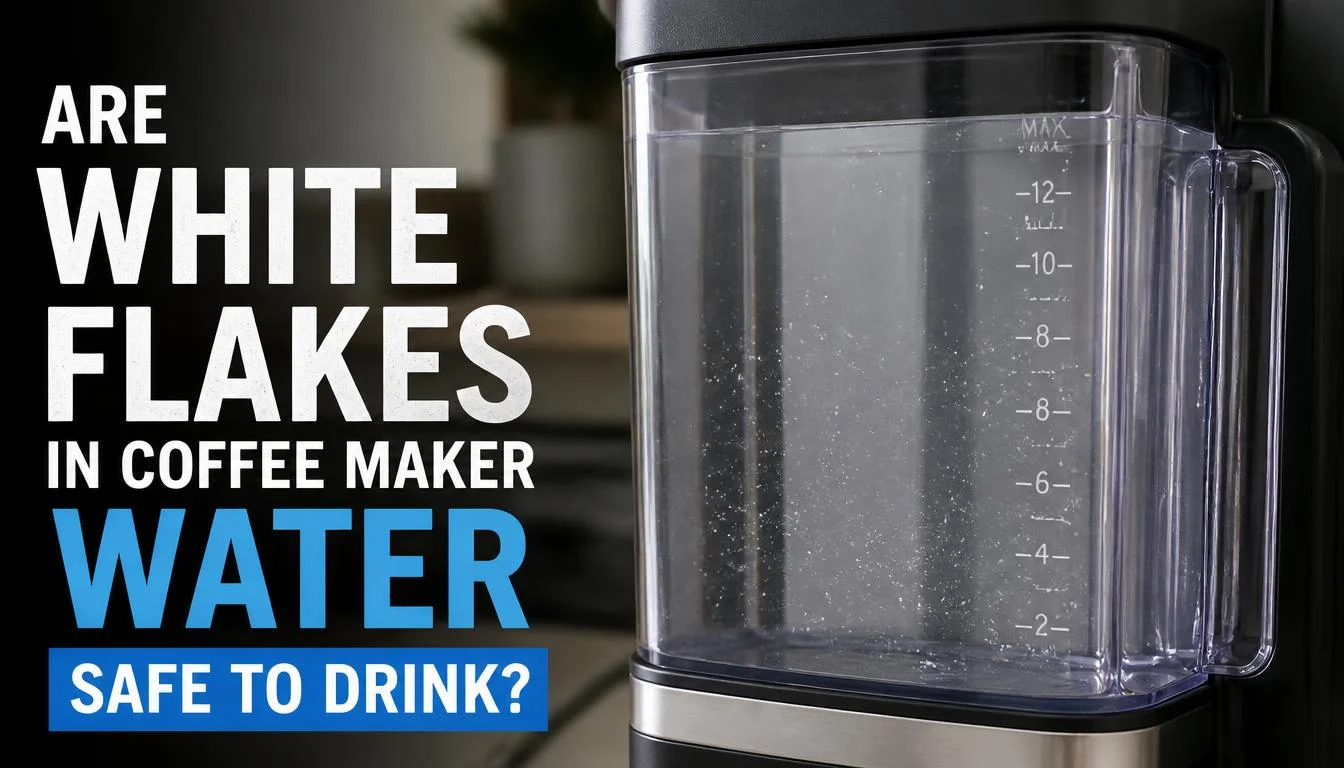
Do not assume that white flakes are safe simply because they are white.
Confirmed mineral scale is generally a different issue from unknown debris. Some manufacturers explain that white, chalky deposits in hot-water appliances are mineral scale rather than pieces of the appliance itself. However, this explanation cannot identify every particle found in every coffee maker.
Consider the following situations.
If the Flakes Are Confirmed Mineral Scale
Mineral scale commonly forms when hard water leaves calcium and other mineral deposits behind.
You should still follow your coffee maker’s cleaning instructions and address the buildup. Do not confuse a familiar-looking deposit with proof that all the water coming from the machine is safe.
If the Flakes Look Like Plastic or Rubber
Stop using the coffee maker if you find particles that resemble pieces of a damaged component.
Check only the removable parts you can safely inspect. Do not dismantle the machine to look for the source.
Contact the manufacturer, especially if the machine is new or still covered by a warranty.
If the Water Smells Unusual or Contains Unknown Debris
Avoid drinking the water until the problem has been identified.
A chemical smell, unusual discoloration, slippery material, or recurring particles should not be treated as ordinary limescale without further checks.
If the source remains unclear after the recommended cleaning process, seek professional advice.
Why Do White Flakes Keep Returning After Cleaning?
If white flakes disappear after cleaning but return a few days or weeks later, the underlying cause may still be present.
Here are some possible reasons.
Your Water Contains High Mineral Levels
Hard water can continue to leave mineral deposits inside the machine.
Consider checking your water hardness and reviewing the recommended maintenance schedule.
Scale Remains Inside the Machine
Cleaning the visible reservoir does not necessarily remove scale from the internal water pathways.
If the machine has not been descaled correctly, deposits may remain and later loosen.
Follow the manufacturer’s approved descaling procedure. If the flakes continue afterward, request further advice rather than repeatedly adding cleaning solution.
Your Water Filter Needs Attention
A filter that is overdue for replacement or has not been prepared according to its instructions may need attention.
Check the filter type, installation, and replacement schedule. Remember that different filters remove different substances, and a filter does not automatically eliminate the need for descaling.
The Particles May Not Be Mineral Scale
If cleaning makes no difference, consider whether the particles could be coming from another source.
Persistent debris, visible component damage, or unusual smells are reasons to stop using the machine and contact the manufacturer.
How to Prevent White Flakes in Coffee Maker Water

You can reduce mineral buildup and keep your coffee maker in better condition with a few simple habits.
Use Suitable Water
Choose water that is compatible with your machine.
A suitable filter may reduce certain substances in the water, depending on its design. However, not every filter removes calcium and magnesium effectively.
Do not automatically switch to distilled water. Some coffee makers have specific requirements for water composition, so follow the manual.
Descale on the Recommended Schedule
The correct descaling frequency depends on the model, water hardness, and usage.
If you live in a hard-water area, your machine may need maintenance more often than one used with softer water. Follow its maintenance indicator and the manufacturer’s guidance rather than relying on a universal schedule.
Clean the Reservoir Regularly
Empty old water when appropriate and clean the removable reservoir as directed.
Regular cleaning helps keep visible surfaces free from residue, although it does not replace internal descaling.
For a practical cleaning routine, read How Often Should I Clean My Coffee Maker?.
Prepare New Water Filters Correctly
Follow the filter’s instructions for installation, soaking, flushing, and replacement. Do not skip a required preparation step.
Watch for Changes in Brewing Performance
Keep an eye out for slower brewing, unusual noises, recurring particles, or changes in water flow.
These symptoms do not always mean mineral buildup is responsible. If you also notice new or unusually loud sounds, our guide to coffee maker making loud noise can help you investigate other possible causes.
When Should You Contact the Coffee Maker Manufacturer?
Contact the manufacturer or an authorized repair service if:
- White flakes continue after correct cleaning and descaling.
- The particles look like plastic, rubber, or another damaged material.
- Water has an unusual chemical smell or unexplained discoloration.
- The coffee maker leaks or its water flow changes significantly.
- The machine makes unusual noises along with persistent debris.
- You suspect an internal component is damaged.
Do not open the machine casing or attempt to repair internal water pathways yourself.
If the problem started immediately after descaling and the machine is also leaking, stop using it and check the relevant safety guidance. Our guide to Coffee Maker Leaking After Descaling covers common causes of leaks and when to seek help.
Frequently Asked Questions
Why Are There White Flakes in My Coffee Maker Water?
White flakes are often caused by mineral deposits from hard water. They may also come from loosened scale after descaling or another source of debris. Inspect the reservoir, check the incoming water, and follow your machine’s cleaning instructions.
Can Hard Water Cause White Flakes in a Coffee Maker?
Yes. Hard water contains dissolved minerals, including calcium and magnesium, that can contribute to limescale buildup. Small deposits may eventually loosen and appear in the water.
Why Are White Flakes Coming Out After Descaling?
Descaling may loosen mineral deposits that were already inside the machine. Incomplete rinsing may also leave cleaning residue. Complete the required rinse procedure and contact the manufacturer if the particles continue.
Can I Use Vinegar to Remove White Flakes From My Coffee Maker?
Only if your coffee maker’s manufacturer permits it. Some models allow vinegar, while others require a specific descaler. Check the manual before starting a cleaning cycle.
Are White Flakes in Coffee Maker Water Harmful?
Confirmed mineral scale is different from unknown particles, but the appearance of a flake alone cannot establish its identity or safety. Avoid drinking water containing unidentified debris until the source has been investigated.
Why Are There White Flakes in My New Coffee Maker?
Check the initial setup instructions, including any required flushing procedure for the machine or water filter. If the particles persist, look for visible damage and contact the manufacturer rather than assuming the flakes are normal.
Why Do White Flakes Appear After Changing a Water Filter?
Check whether the replacement filter requires soaking or flushing and make sure it is installed correctly. If particles continue after following the instructions, contact the filter or coffee maker manufacturer.
Will Filtered Water Stop White Flakes in My Coffee Maker?
A suitable filter may help reduce some minerals, depending on its design. However, not all filters remove the minerals responsible for scale, and filtered water does not always eliminate the need for descaling.
How Do I Know Whether the White Flakes Are Limescale?
Hard, chalky deposits and mineral residue on visible surfaces may suggest limescale. However, appearance alone cannot confirm the cause. If the particles remain after proper cleaning or look unusual, seek advice from the manufacturer.
Should I Replace My Coffee Maker if White Flakes Keep Appearing?
Not necessarily. First, follow the correct cleaning procedure and ask the manufacturer to help identify the problem. Replacement may be appropriate if the machine has damaged components or cannot be repaired safely, but persistent flakes alone do not automatically mean you need a new coffee maker.
Final Thoughts
White flakes in coffee maker water are often related to hard-water minerals, but the cause is not always limescale. The timing of the problem, the appearance of the particles, and the condition of your machine can help you decide what to check next.
Start by inspecting the water supply and removable reservoir. If mineral buildup is likely, use the correct descaling method and complete every required rinse cycle. Avoid guessing about the identity of unknown particles or repeatedly adding cleaning solution without checking the cause.
If the flakes keep returning, look unusual, or appear alongside leaks, strange smells, or other performance problems, stop using the coffee maker until the issue has been investigated.
Finding the source first will help you choose the right fix, avoid unnecessary cleaning, and keep your coffee maker working as intended.

“I believe great cooking starts with the right tools, trusted advice, and a little confidence in the kitchen.”
Hi, I’m Emma Carter. My love for cooking began in my grandmother’s kitchen, where I learned that every great meal starts with simple ingredients and the right cookware. Over the years, I’ve spent countless hours researching, testing, and comparing kitchen appliances, cookware, coffee makers, air fryers, and other everyday kitchen essentials.
Here at KiCook, my goal is to make your buying decisions easier with honest product reviews, practical buying guides, and easy-to-follow cooking tips. Whether you’re upgrading your kitchen or searching for the best appliance for your home, I focus on providing clear, reliable, and research-backed information you can trust.
When I’m not testing new kitchen gadgets or writing in-depth guides, you’ll usually find me trying new recipes, visiting local farmers’ markets, or enjoying a quiet cup of coffee while planning my next kitchen project.